Wrist Pain from Gaming: Exercises and Prevention Tips

Key Takeaways



- Most wrist pain from gaming can be attributed to bad posture, repeated movements, or poor ergonomics at your gaming setup.
- Stretching every 30-45 minutes, doing wrist exercises, and using an ergonomic desk/chair/setup/peripherals are the ways to prevent wrist pain.
- Mouse and keyboard users are more prone to carpal tunnel. Console and mobile users are more prone to tendonitis.
- Take breaks by rotating your primary input source to give your body a chance to rest those muscles.
- If you experience lasting numbness/tingling in your wrist or your wrist pain persists when attempting to rest your wrists, consult a doctor.
Over 36 percent of professional esports players experience wrist pain. Chances are even higher for casual gamers sitting for hours with poor posture. However, by doing a few easy exercises and making some small adjustments to your setup, you can avoid wrist pain entirely. And if you’re already in pain, we’ve got you covered there too.
We’ll go over the reasoning behind why gaming hurts your wrists, teach you a 5 minute stretch routine you can do between games, and discuss the setup changes that will have the biggest impact.
Why gaming causes wrist pain
Gaming causes wrist pain because the thousands of small movements you make accumulate into tissue damage over time.
When you game, your hands are making thousands of repetitive micro-movements per session. Mouse clicks. Key presses. Joystick flicks. Screen taps. All add up. Those small actions are cumulative stress on your wrists and forearm tendons, muscles, and nerves over hours of play.
According to OSHA, there are three main risk factors for musculoskeletal injuries:
- Repetition: You’re repeating the same motions for hours
- Awkward postures: Your wrists are often bent at bad angles
- Excessive force: You grip controllers or mice harder than you realize
Pain during or after a gaming session is a warning sign. The “no pain, no gain” thing works in a gym, but not so much at your desk.
Mouse and keyboard strain
When your wrist is resting on your desk, you’re flattening out your median nerve. This is responsible for most cases of carpal tunnel syndrome in PC gamers.
PC gamers face two specific strain patterns:
- Wrist extension compresses your median nerve
- When you rest your wrist on a desk or pad, your hand angles upward in a position called wrist extension. Hold that for hours and you compress the median nerve as it passes through the carpal tunnel.
- Try to keep wrist extension below 10-15 degrees. That will relieve pressure on the nerve.
- Repetitive clicking strains your extensor tendons
- Small mouse movements and repetitive clicking put strain on the extensor tendons along the back of your forearm.
If you’ve experienced a nagging pain from your wrist up your arm to your elbow, you’ve probably developed extensor tendinopathy.
Controller strain
Controller players have their own problems. The big one is called “gamer’s thumb,” or De Quervain’s tendonitis. It’s caused by repetitive thumb movements on joysticks and triggers. Hours of analog stick movement and trigger pressing inflame the tendons that control your thumb where they pass through your wrist.
Controllers spread pressure better than mice, so carpal tunnel is less common. But long sessions still cause problems, especially if you grip too hard during intense moments.
Mobile gaming strain
Gripping your phone in landscape mode forces your wrists into an awkward flexed position while your thumbs do all the repetitive work.
Nobody talks about mobile gaming wrist pain, which is odd considering nearly one third of gamers only play mobile games. In a recent survey of mobile esports players conducted in 2022, 40.9% experienced wrist and hand pain while playing. Thumb pain was even more common at 45.5%.
Try setting your phone up on a stand and use a Bluetooth controller to play if you know you’re going to be on mobile for a while. If you plan to game for long stretches of time, play on the desktop. Cross-platform games like those on Plarium Play allow you to transfer your mobile gaming progression to PC, so your thumbs and wrists can benefit from an all new range of motions.
Five Minute Stretch Routine to do Between Matches
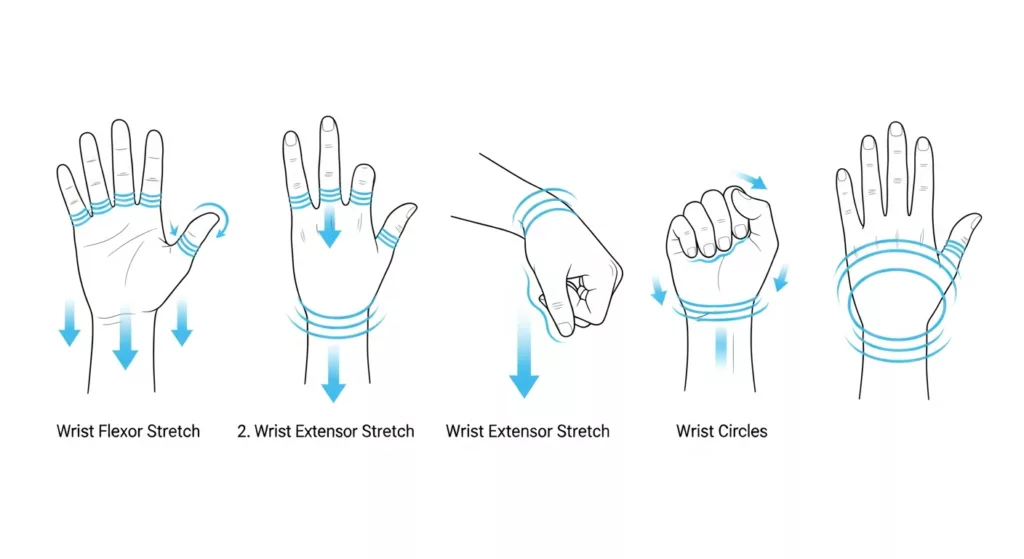
Complete the stretch routine pictured above every half hour to every hour of gameplay including during queue times, loading screens, and wait times in matchmaking. The more consistently you stretch, the more effective it will be.
Wrist flexor stretch
- Raise one arm in front of you with your palm facing upwards
- Grab your fingers with your opposite hand and gently pull them towards you until you feel a stretch down the inside of your forearm
- Hold for 15-20 seconds, then repeat on opposite arm
Wrist extensor stretch
- Extend your arm, palm facing down
- Curl your fingers toward the floor and use your other hand to apply gentle pressure
- Hold 15-20 seconds per side (you should feel this along the top of your forearm)
Wrist circles
- Make a loose fist with both hands
- Slowly circle your wrists 10x clockwise, then counterclockwise
- Ensure your circles are slow and controlled. If any position causes pain, decrease your range of motion.
Finger spreads
- Spread all five fingers as wide as you can and hold for 5 seconds
- Make a tight fist
- Repeat 10 times
Tendon glides
- Cycle through the five hand positions in sequence below:
- Fingers straight and together
- Hook fist (bend at middle knuckles only)
- Full fist
- Table-top (fingers straight but bent at the base)
- Straight fist (fingers curled at base and middle joints)
- Do 5 full cycles at a comfortable pace
Doing tendon glides keeps your tendons gliding easily through the carpal tunnel and reduces the friction that leads to inflammation. Do this exercise if you only want to do one from this list.
Hand Exercises to Build Strength for Long Term Protection
Your wrists require muscle endurance to handle marathon gaming sessions. The exercises below build the resilience that keeps carpal tunnel and tendonitis from starting. You don’t need to do these during gaming sessions. Three to four times a week is enough.
Wrist curls
- Grab a light dumbbell or filled water bottle (1-2 lbs)
- Rest your forearm on a table with your wrist hanging off the edge, palm facing up
- Curl your wrist up, bringing the weight with you, then slowly lower the weight back down
- Do 10-15 reps before switching hands (palm facing down) and doing reverse wrist curls
- The reverse version targets the extensors
Finger extensions with a rubber band
- Wrap a rubber band around all five fingertips
- Spread your fingers apart against the resistance and hold for 2-3 seconds
- Release and repeat for 10-15 reps per hand
This counterbalances all the gripping and squeezing your hands do while gaming.
Grip squeezes
- Squeeze a stress ball or grip trainer
- Hold for 3-5 seconds, then release slowly
- Perform 10-15 reps per hand with moderate effort
Fix your setup before it breaks your wrists
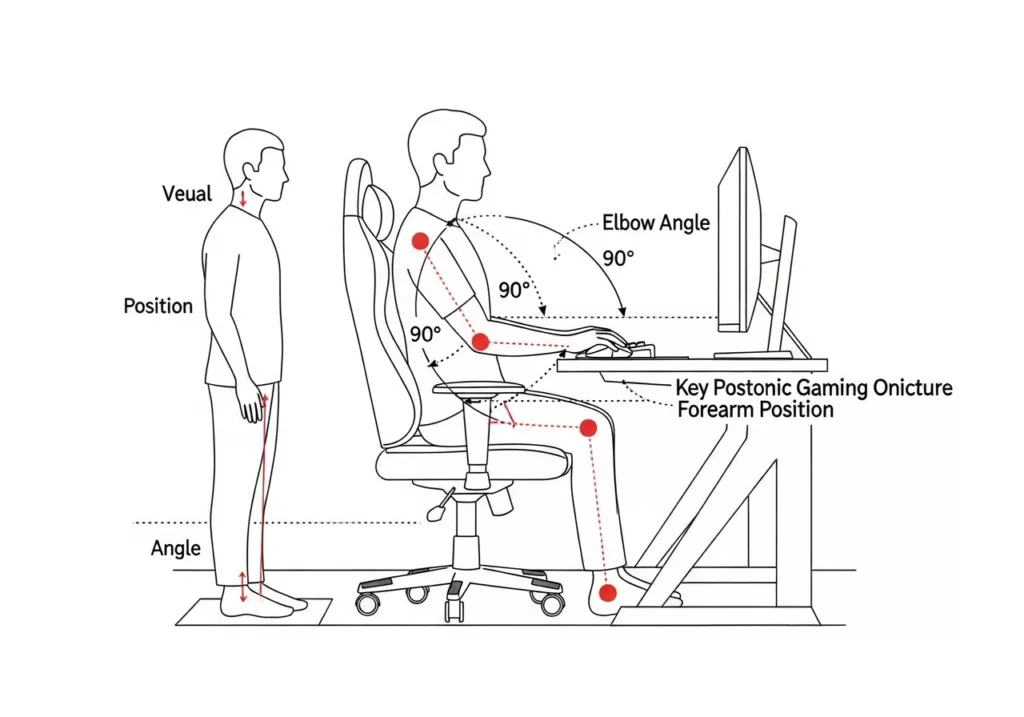
Your ergonomic setup will do more for your wrists than any exercise. All the stretching in the world won’t help if your desk, chair, and peripherals shove your wrists into bad positions every time you sit down to play games.
Chair and desk height
- Sit with your feet flat on the ground
- Ensure your knees are bent at approximately 90 degrees and your thighs parallel with the ground
- Place elbows at approximately a 90-100 degree angle with forearms parallel to desk surface
- Adjust keyboard tray height so that it is sitting 1-2 cm below elbows
If you have a non-adjustable desk, you can raise the height of your chair and utilize a footrest.
Mouse and keyboard placement
- Hold your mouse no more than 10-15cm away from your keyboard
- Have a large mousepad so that you can move your mouse with your entire arm instead of flicking your wrist
- Don’t use the “kickstands” at the back of your keyboard to lift it upwards
- Ideally, use a slight negative tilt so that the front edge of the keyboard is higher than the back. If your keyboard doesn’t allow this, keep it flat.
- Controller and Phone Ergonomics
Controller and mobile ergonomics
Play games with a controller by resting elbows on armrests/lap and relaxing your grip. You’ll find most people grip tighter than they need to, particularly if they’re playing competitively. That tension transfers directly into your wrists.
If you play games on your mobile device, grab yourself an inexpensive tabletop phone stand. They eliminate wrist strain from holding your phone, allow your hands to free up for a Bluetooth controller, and put your screen at an angle where you’re not leaning forward to see it. If you’re going to play for a while, consider playing PC/browser games with your full keyboard-and-mouse setup instead of your phone.
Prevention habits that actually stick
You can know every stretch and ergonomic trick on this page and still wreck your wrists if you don’t actually do them. These habits help.
The 30-minute rule
Step away from the game every half hour or so. Short “mini-breaks” of even just 20-30 seconds where you stretch out your hands and do a few circles with your wrists can have a cumulative impact over the course of several hours. Use your downtime while in game queues/loading screens/respawning/between matches to give your body a break.
Alternative input devices
Rotate between mouse and keyboard, controller, and touchscreen. They all work your hands and wrists differently, so by switching up your input mid-game (or between games), you can allow fatigued tendons to rest while still playing.
This is especially easy if you play games that offer cross-platform play. If your wrists are sore from a long mouse-and-keyboard session, pick up where you left off on mobile with a controller or touchscreen. That variety isn’t just good for your wrists. It keeps your gaming sessions feeling fresh.
Wrist braces: when and how to use them
If you already have mild pain, a brace may help. Look for something adjustable, breathable, and that keeps your wrist in neutral but isn’t overly tight. Wear it when gaming to take pressure off your tendons and give them room to heal.
That being said, it’s not a long-term solution. If you need to wear a brace every time you game, something about your setup, posture, or break schedule needs to change.
Heat and ice
Ice is great for acute pain or swelling you might have after a gaming session. Wrap an ice pack in a thin towel and apply for 10-15 minutes. Ice will help reduce inflammation and numb the pain.
Heat is better for stiffness or general chronic tightness. Apply a warm compress or heating pad for 15-20 minutes to increase blood flow and loosen tight tissue. Heat and ice are no substitute for stretching and strengthening, but can help alleviate pain while you work on your habits.
When do you need to see a doctor?
See your doctor if you:
- Experience numbness or tingling in your fingers while or after gaming that persists (common with carpal tunnel syndrome)
- Feel pain that lasts more than one week despite resting and trying home treatment methods
- Notice swelling, redness, or warmth around your wrist joint
- Experience clicking/snapping when moving your wrist (could mean your tendon is popping/subluxing out of place)
- Have weakness when gripping objects
While most cases of gaming-related wrist pain will resolve after following the self-care tips in this article, certain symptoms can indicate a more serious condition.
Treatment of carpal tunnel syndrome or tendonitis often includes physical therapy, bracing, and ergonomic modifications. The earlier you address the issue, the greater likelihood that rest for a few weeks will be enough to resolve your symptoms. If left untreated, you could be looking at months of physical therapy or even surgery.
FAQs about Gaming Wrist Pain
Can gaming cause carpal tunnel syndrome?
How long does gamer's wrist take to heal?
Severe cases will take longer if you’ve been ignoring the pain for months. In that case, you may need to see a physical therapist.
Is a wrist brace good for gaming?