What Is Packet Loss? Causes, Fixes, and Prevention



Packet loss occurs when data packets fail to reach their destination across a network.



Packet loss is one of the most frustrating things a gamer can run into. You press the button. Your character does nothing. Two seconds later, you teleport into a wall and you’re already eliminated. If you’ve been experiencing this in your games, then you have packet loss and you need to fix it before you start dropping ranks.
This guide breaks down the mechanics, walks through every common packet loss cause, and gives you practical steps to reduce or eliminate it entirely.
What is packet loss?
Packet loss is when one or more packets of data travelling across a network fail to reach their destination. Any online game you play, any video you stream is basically information being sent back and forth between your computer and some server in packet form. When some packets don’t arrive your connection is interrupted and you experience packet loss.
A great analogy for packet loss is sending your friend postcards. But let’s say the post office loses one in every ten postcards you send. Your friend can kind of follow your conversation. However, there will be gaps.
Even a 1-2% packet loss rate can cause noticeable rubber-banding, input lag, and desync in competitive online games. At 5% or above, most games become unplayable.
Packet loss is measured as a percentage of total packets sent. A rate of 0% means clean, uninterrupted data flow. Most connections hover near 0% under normal conditions. The trouble starts when that number climbs, even slightly.
How packet loss differs from high ping and lag
Ping, lag, and packet loss describe different problems.
- High ping means your packets are arriving slowly.
- Lag is a general term for any kind of performance problem during gameplay.
- Packet loss means packets are not arriving at all.
You can have low ping and still experience packet loss. The two problems do not always go together. That is why a fast internet plan does not automatically protect you from packet loss.
High ping makes everything feel delayed but consistent. Packet loss causes sudden freezes, teleporting characters, and actions that fail to register. If your game feels like it is glitching rather than just slow, packet loss is usually the culprit.
What causes packet loss in gaming?
Here are the most common causes of packet loss in gaming.
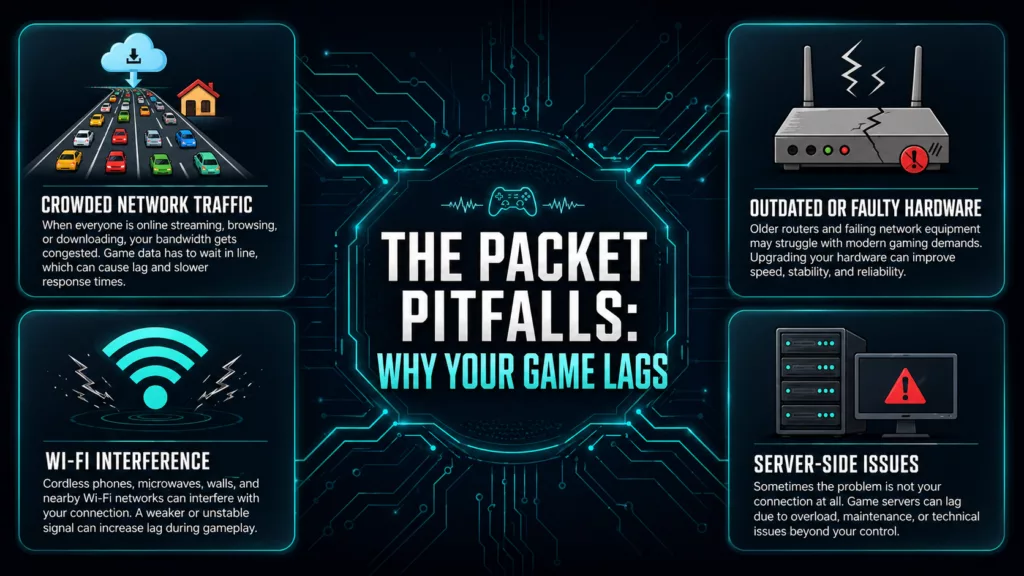
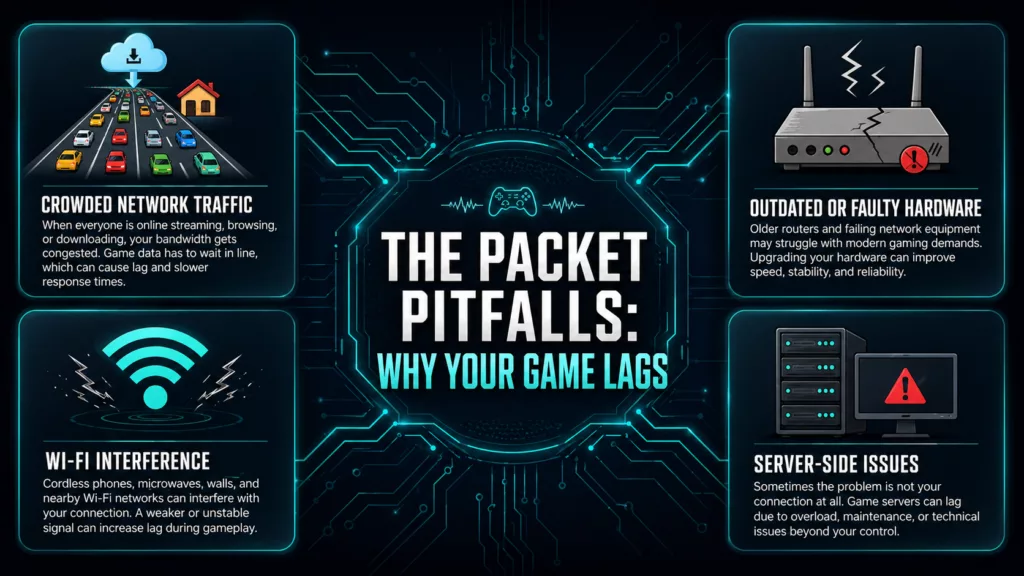
The most common causes of packet loss range from network congestion to faulty hardware.
1. Network congestion
As gamers, we experience network congestion most often in the evenings when the rest of our household is using the internet as well. Someone streaming, on a video call, or downloading large files can send your connection into packet loss hell even if your speed test looks acceptable.
2. Wi-Fi interference and weak signal
Wireless connections are also significantly more prone to packet loss. Walls, appliances, other networks, and even some electronics can cause interference with your Wi-Fi signal. This problem becomes even worse the more distance there is between you and your router.
Just because your wireless connection is showing as full bars doesn’t mean packets will get through cleanly. A strong signal does not equal a quality signal. Try connecting to your router via ethernet cable while gaming if at all possible.
3. Faulty or outdated hardware
Damaged Ethernet cable, router firmware that needs updating, or old network card in your PC or console are all potential causes of packet loss. Hardware problems can go unnoticed since your connection shows as active, and speed tests will complete without any warning signs.
This is particularly common with routers which can develop bugs and memory leaks the longer they’re active. A router that hasn’t been restarted for months may inexplicably start dropping packets. Restarting the router will temporarily solve the problem, but if it continues to occur you’ll need to replace the unit.
4. Server-side problems
Packet loss doesn’t always originate from your end of the connection. Game servers get bogged down, run into hardware problems, and have maintenance periods just like any other piece of technology.
If every player in your game is rubberbanding at the same time, it’s very likely coming from the server.
Before tearing apart your home network, see if the game’s official status page reports any outages. Many people waste hours trying to locally resolve something that the game provider has no capacity to fix from your end.
Titles from Epic Games, Rockstar Games, Riot Games, and Plarium have dedicated server status trackers so players can look up if their game servers are down.
5. ISP throttling and routing problems
Your traffic makes multiple hops across networks to reach a game server. Congestion at one of those hops can cause packets to get dropped in-transit.
ISP’s can also throttle gaming packets during peak hours. This can result in packet loss even if you’re seeing decent raw speeds.
Do a traceroute (tracerect on Windows) test to see where exactly packets are getting dropped in your route.
6. Software and driver conflicts
Old network adapter drivers, aggressive firewall rules, bandwidth stealing background processes can also cause packet loss. Security software can often filter too much traffic by mistake and drop packets it thinks are suspicious.
How to test for packet loss
Before you start fixing things, confirm that packet loss is actually the problem. There are a few easy ways to test it.
- Ping test via command prompt: On Windows, open Command Prompt and run ping -n 50 google.com. Look at the results. It will report how many packets were lost.
- On Mac and Linux, run ping -c 50 google.com instead.
- In-game diagnostics: Most online games include a network stats overlay. In RAID: Shadow Legends and other Plarium games, network quality indicators appear during gameplay. Watch for packet loss warnings during a session.
- Third-party tools: There are tools that can run ongoing packet loss tests while you play and pinpoint exactly where along the route the drops are occurring.
If your ping test to Google shows 0% loss but your game shows consistent packet loss, the problem likely lies closer to the game server rather than your router.
How to fix packet loss
The right fix for packet loss depends on the cause. You can work through the following fixes in order before contacting your ISP.
A step-by-step approach to fixing packet loss works better than random troubleshooting.
1. Restart your router and devices
Always start here. Restarting your router clears cache, re-establishes your connection to your ISP, and clears out memory leaks that occur over time. You should restart your gaming computer or console as well. This step alone solves more packet loss problems than any other.
2. Switch to a wired Ethernet connection
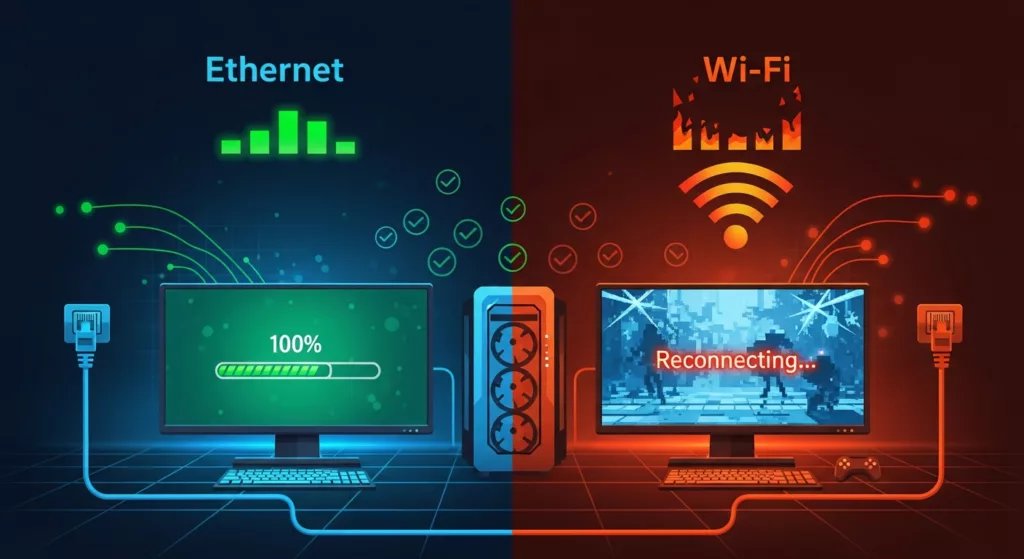
Ethernet provides much better packet delivery for gaming than Wi-Fi.
Switching from Wi-Fi to Ethernet is the single biggest improvement you can make if you’re gaming wirelessly. Hardwiring your connection removes signal interference, reduces latency, and cuts your packet loss rate significantly. Cat 5e or Cat 6 cable is cheap and easy to find.
If you can’t run a wire, sit as close to your router as possible and switch to 5GHz. 5GHz offers faster speeds and less interference than the overly congested 2.4GHz band.
3. Update your network drivers and router firmware
Check Device Manager on Windows for network adapter driver updates. Visit your router manufacturer website for the latest firmware. Both can contain bug fixes that directly address packet loss.
4. Check and replace cables
Damaged Ethernet cables are one of the most skipped causes of packet loss. Swap out the Ethernet cable from your router to computer, or router to modem just to eliminate the possibility.
5. Use Quality of Service (QoS) settings
If your router allows, enable Quality of Service rules. This essentially tells your network to prioritize gaming traffic above other types. Newer routers will have this feature, and you’ll usually see games tagged as high priority by default.
6. Close background applications
Streaming videos, large downloads, and even cloud backups all eat into your available bandwidth. These can force your network connection into packet loss range when they activate. Make sure to shut down background programs that use your bandwidth when gaming.
7. Change your DNS server
Routing problems can sometimes be resolved by switching your DNS server. Try changing your DNS server settings from ISP defaults to:
- Google DNS (8.8.8.8 / 8.8.4.4)
- Cloudflare DNS (1.1.1.1)
8. Contact your ISP
If all else fails you can contact your ISP and see if they notice any problems from their end. Make sure to call when you are experiencing packet loss. Ask them to run a line quality test and they should be able to update you with all the info on their side.
How to prevent packet loss
Here are a few habits to keep your connection packet loss-clean over the long term.
- Reboot your router once a month
- It clears memory leaks and refreshes the connection
- Keep drivers and firmware updated
- So hardware bugs do not quietly degrade your connection
- Use wired connections for gaming
- Ethernet is more reliable than Wi-Fi
- Avoid playing during peak household usage hours if packet loss is a recurring problem on shared connections
- Periodically run a packet loss test to catch problems before they become severe
Professional gamers almost universally use wired connections for competitive play. The stability difference over Wi-Fi is significant enough that no serious player takes the risk.
How packet loss affects different game types
Packet loss doesn’t impact all games in the same way.
Strategy and turn-based games: Games like Vikings: War of Clans can withstand packet loss better since most actions aren’t bound by fast timings. In such games, you may even experience low rates of packet loss, but not notice anything is wrong. You can check out some Plarium strategy games, if you’re looking for a game that plays great, even on shaky networks.
PvP and action games: PvP action games like Mech Arena, RAID: Shadow Legends PvP Arenas are extremely susceptible to packet loss. Even ping as low as 2-3% packet loss can result in missed hits and desync that feel game-deciding.
RPG and collection games: While roguelikes and deep progression RPGs can endure higher rates of packet loss while navigating menus or non-combat environments, desync in RPG games can still result in bugs and lost progression.
Plarium Play is Plarium’s free desktop launcher which allows you to play Plarium games natively on PC and Mac. Connections over a computer tend to be more stable than those over mobile phones. If you can play on Plarium Play over a stable wired connection you’ll be unlikely to encounter packet loss.
When to give up on Wi-Fi
Some home setups make wired connections genuinely difficult. Long distances from the router, thick walls, and rented accommodations all make running Ethernet cables impractical. In those cases, consider these alternatives before giving up.
- Use powerline adapters
- These send internet data through your existing electrical wiring. Performance varies by home wiring quality, but they are often significantly better than Wi-Fi for gaming.
- User MoCa adapters
- If your home has coaxial cable outlets, MoCA adapters convert those into a wired network. They deliver near-Ethernet reliability.
- Use a Wi-Fi 6 router with dedicated gaming features
- If you must use Wi-Fi, use the fastest protocol available within a decent range.
None of these completely match a direct Ethernet connection, but they are meaningful improvements over standard Wi-Fi.
Frequently asked questions
| What is a normal packet loss rate for gaming? 0%. Any packet loss over 1% while gaming should be investigated. 5% or more packet loss will severely impact most competitive games. |
| Can a VPN fix packet loss? Sometimes. VPNs route your connection differently and can bypass packet-loss-inducing congested nodes on your ISP’s network. But a bad VPN server can also worsen packet loss. |
| Does packet loss affect download speeds? Yes. Severe packet loss can halve your effective download speeds. When packets are dropped your computer must resend them, which hurts your overall throughput. |
| Is packet loss my ISP’s fault? It can be, especially if it occurs at specific times of day or after ruling out local causes. Run a traceroute test and see where packets are losing. |
| Will a faster internet plan fix packet loss? It might, but not always. Packet loss is typically a quality problem, not a speed problem. |